
Beyers Park to Bartlett: Signal Faults That Turn Out Not to Be the Dish
When the picture disappears, almost everyone looks up. The dish is the visible part of the system, so it gets the blame. Yet plenty of faults on the Beyers Park and Bartlett Road side of town end up nowhere near the roof — the dish was fine the whole time, and the trouble was in a connector, a cable, a decoder setting or the account.
That matters because chasing the wrong thing is expensive. Someone climbs up, re-aims a dish that did not need re-aiming, and the picture comes back for a day because the cable got jiggled. Here is how to tell the difference before anyone gets on a ladder.
Read the Code First
The message on screen is the cheapest diagnostic you will ever get. DStv publishes a full list of its error codes, and the code tells you immediately whether you are looking at a signal problem or an account problem.
E48 — a genuine signal fault
DStv's own description: "This error indicates that your decoder isn't receiving an adequate signal from the satellite dish. Possible reasons include damaged cables, loose connections, an improperly aligned dish, or severe weather conditions."
Read that list again. Only one of the four is the dish itself. Two of them are cable and connector problems, which are far more common and much easier to fix.
E48-32 — the weather version
Same family, different cause. DStv puts it plainly: "But the rain can interrupt your DStv signal. Due to bad weather, you may see a 48-32 error", and adds that you wait for the signal to return. If a storm is sitting over you, this one usually clears on its own once the weather moves off. If the sky is clear and it is still on screen, treat it as an ordinary E48.
E16 and E17 — not a signal problem at all
DStv's own index lists these as "E16 - Service is currently scrambled" and "E17 - No Active Subscription". Neither has anything to do with your dish, your cable or your installation. No amount of ladder work will shift them. These are account matters, and they go to MultiChoice on (011) 289 2222 or through the MyDStv app.
We are an independent installation team, not a MultiChoice branch or walk-in centre, so account and payment questions genuinely are not ours to solve — but telling you that in thirty seconds on the phone is a lot cheaper than a visit.
The Faults That Are Not the Dish
The connector at the back of the decoder
The single most common thing we find. The F-connector works loose, or was never properly screwed down, or someone moved the TV unit to vacuum behind it. Hand-tight, square on, no bent centre pin. Check this before anything else.
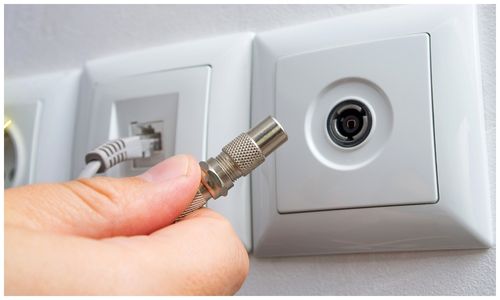
The wall point
Where the cable comes through the wall into the room, there is usually a plate with a socket. Those get knocked, painted over, or wired in a hurry when a room was redecorated. A point that reads dead from inside can have a perfectly healthy cable behind it.
Water in the outdoor connector
The join at the LNB end sits outside all year. If it was not properly sealed, rain finds it, and the corrosion that follows does not fail cleanly. It gives you a picture that breaks up on some channels and not others, gets worse when it is wet, and then recovers — which reads exactly like an alignment problem and is not.
Sun-damaged cable
Coax stapled along a north-facing wall gets a lot of Highveld sun. The outer sheath goes brittle and cracks, and once it cracks, moisture gets into the braid. This is a slow failure: months of an occasional flicker before the picture goes altogether.
The LNB, not the dish
The LNB is the small unit on the end of the dish arm. DStv describes it as "the receiving 'arm' that you see mounted on your satellite dish. It collects radio waves from the dish and converts these into a signal which your decoder can understand." LNBs fail with age and after nearby lightning, and when one does, the dish is still pointing perfectly at a satellite it can no longer hear. Replacing an LNB is a small job; re-aligning a dish that was never wrong is a wasted one.
The decoder itself
Decoders lock up, lose their settings after a power cut, or come back from a software update needing to run through the installation wizard again. If one decoder in the house has a picture and another does not, and both are fed from the same dish, the dish is not the problem.
An Extra View link that has dropped
If two or three decoders are linked, one of them is the primary and the others depend on it. DStv explains the mechanism: "the primary decoder is the one which sends the 'heartbeat' to the secondary decoder(s)", and "the secondary decoder(s) will NOT work if the primary decoder is removed or switched off, or if the heartbeat is no longer received for any reason". So a TV in the back bedroom going dark can simply mean the lounge decoder was switched off at the wall.
The Five-Minute Check Anyone Can Do
All of this is done indoors or from the ground. There is no reason to climb onto a roof to diagnose a fault.
1. Write down the exact code. Including the part after the dash. E48 and E48-32 send you in different directions.
2. Power-cycle the decoder at the wall. DStv's own suggested fix says to "switch off the decoder at the wall plug and wait for at least 10 seconds before turning it back on". Ten seconds, not two — the wait is the point, because the decoder needs time to discharge.
3. Push and screw the cable in at the back. Finger-tight and straight.
4. Check the other TVs in the house. If every decoder is dead, the fault is shared: the dish, the LNB or the main cable. If only one is dead, it is that room, that cable or that decoder.
5. Look at the sky and the dish from the ground. A storm overhead explains itself. A dish that is visibly tilted compared to how it normally sits is worth reporting — but do not try to move it back, because small movements make a large difference and it is easy to make things worse.
Work through those and you will either have your picture back or you will know a great deal about where the fault is not. Our DStv fault-finding page runs through more symptoms code by code.
When It Is Worth Getting Someone Out
- The weather cleared hours ago and E48 is still on screen
- Every decoder in the house lost signal at the same moment
- The picture breaks up on some channels but not others
- The fault comes and goes with rain — a classic sign of water in a connector
- Something in the house was damaged in a storm and the picture went with it
- The dish has obviously been moved, by wind, a ladder or building work
- Linked decoders have stopped seeing each other
A visit with signal testing and diagnosis starts from R550 as a guide, with any parts quoted before they are fitted. If it turns out to be a ten-year-old cable rather than the dish, that is what we will tell you — and a routine check of the dish, cable and connectors is usually the cheaper way to stop the same fault returning next season. Everything we cover is set out on our DStv installation and repairs in Boksburg page.
A Note on Where the Dish Points
People sometimes ask whether Boksburg has a difficult angle. It does not, and it is not special: by our own measurement the dish looks east-north-east at roughly 62 degrees, at an elevation around 36 degrees, with the LNB skewed about 53 degrees. Those figures are effectively the same right across the East Rand — Boksburg, Benoni, Kempton Park, Germiston — because the satellite is thousands of kilometres away and a few kilometres of town does not move it. What differs between houses is what is standing in the way: a wall, a neighbour's roof, or a tree that was small when the dish went up.
Frequently Asked Questions
My DStv says searching for signal but the dish looks fine — what now?
Start indoors. Check the connector at the back of the decoder and the wall point, then power the decoder off at the wall for at least ten seconds. If every TV in the house is affected, the fault is shared and is more likely to be the LNB or the main cable than the dish itself. If only one room is affected, it is that room's cable, point or decoder.
Why does my picture come back when the rain stops?
Heavy rain and thick cloud weaken the satellite signal, and DStv shows E48-32 when that happens. That is normal and it clears with the weather. What is not normal is losing the picture in light rain — that usually means the system had very little signal margin to start with, from a tired LNB, a damp connector or alignment that is slightly off.
Can a power cut break my DStv?
It can leave a decoder in a confused state, and a surge can damage an LNB or a decoder outright. If the picture went during a power event and did not come back afterwards, and especially if other electronics in the house were affected too, that is damage rather than alignment, and it needs testing rather than a dish adjustment.
Need Help with Your DStv?
Get help with DStv installation, signal faults and Extra View in Boksburg and across the East Rand. Call or send a message for a no-obligation quote.